Whale Tracking
GodEye monitors thousands of Polymarket wallets in real time. Trades are detected within seconds. Every wallet is scored and ranked daily.
Discover Page
The home page gives you a quick overview of what’s happening across the platform:
- Platform stats: Total volume, active traders, total markets, open positions
- Strong Signals: Markets where multiple whales are betting in the same direction, with signal strength and trader count
- Top Traders: The top 10 ranked whales with P&L, win rate, and copier count
- Hot Bets: Recent high-volume trades from whales
Click any signal or bet to open the trading modal. Click any trader to view their profile.
Leaderboard
Your starting point for finding traders worth copying.
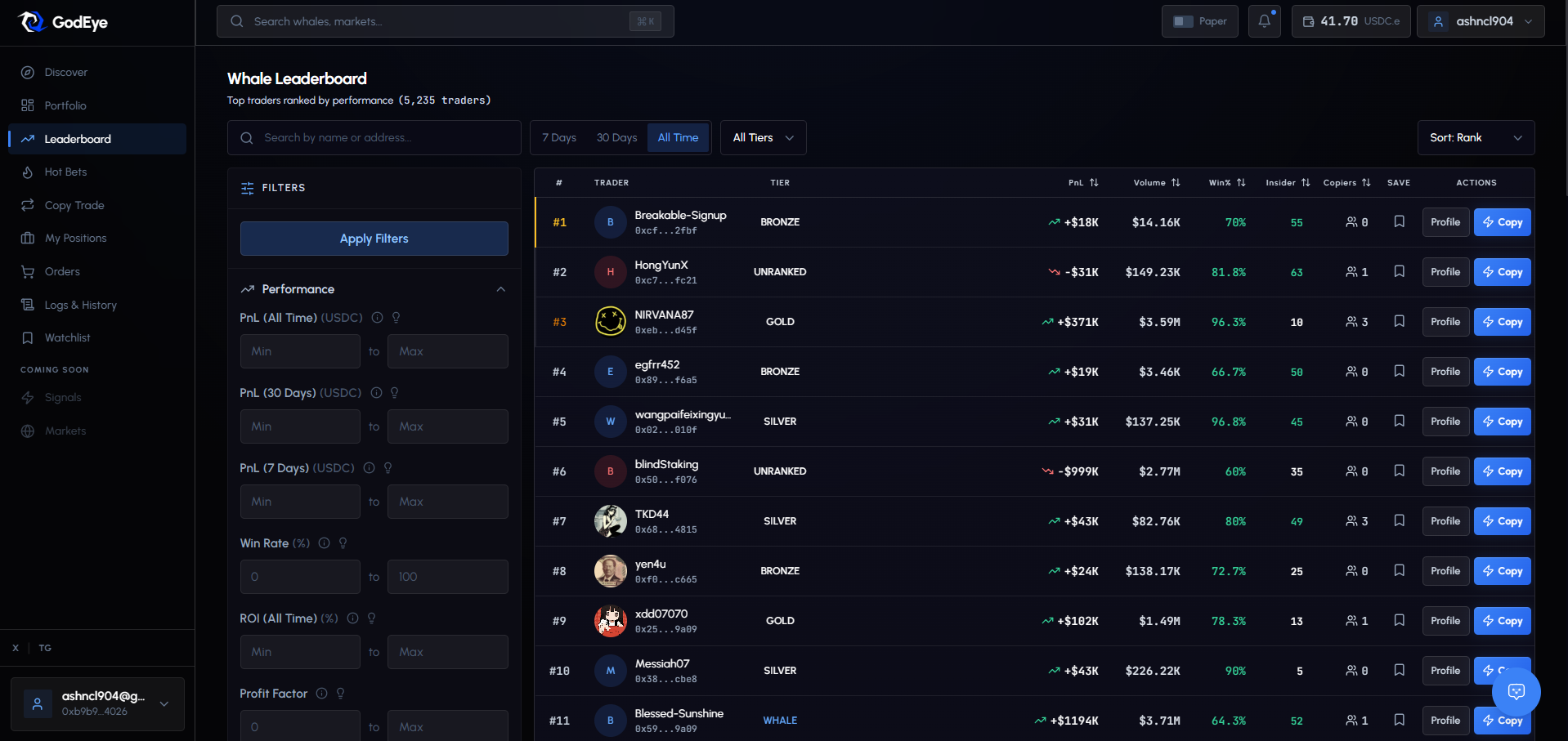
Filters
| Filter | Options |
|---|---|
| Tier | All, Whale, Gold, Silver, Bronze |
| Category | Politics, Crypto, Sports, Entertainment, Science, Business |
| Timeframe | 7 Days, 30 Days, All Time |
Filters persist to your session. Applied filters show as removable chips below the filter bar.
Sorting
Sort by Rank, Profit, Volume, Win Rate, Trades, or Copiers. Toggle ascending/descending.
Search
Find traders by name, username, or wallet address. Results update as you type. Clear button to reset.
Each Trader Row Shows
| Element | Description |
|---|---|
| Rank | Position on the leaderboard (medals for top 3) |
| Avatar | Profile image or colored initial |
| Name | Display name, custom nickname, or truncated address |
| Verified badge | Checkmark if confirmed |
| Tier badge | WHALE (purple), GOLD (yellow), SILVER (gray), BRONZE (amber) |
| 30D P&L | Profit/loss over 30 days (green if positive, red if negative) |
| Win Rate | Percentage of winning trades |
| Volume | Total trading volume |
| Copiers | Number of users copying this trader |
Quick Actions Per Trader
| Action | Description |
|---|---|
| Star icon | Add to / remove from your Watchlist |
| Copy button | Open the copy config modal for this trader |
| More menu | View Profile, Edit watchlist entry, Report |
Advanced Filters (click to expand)
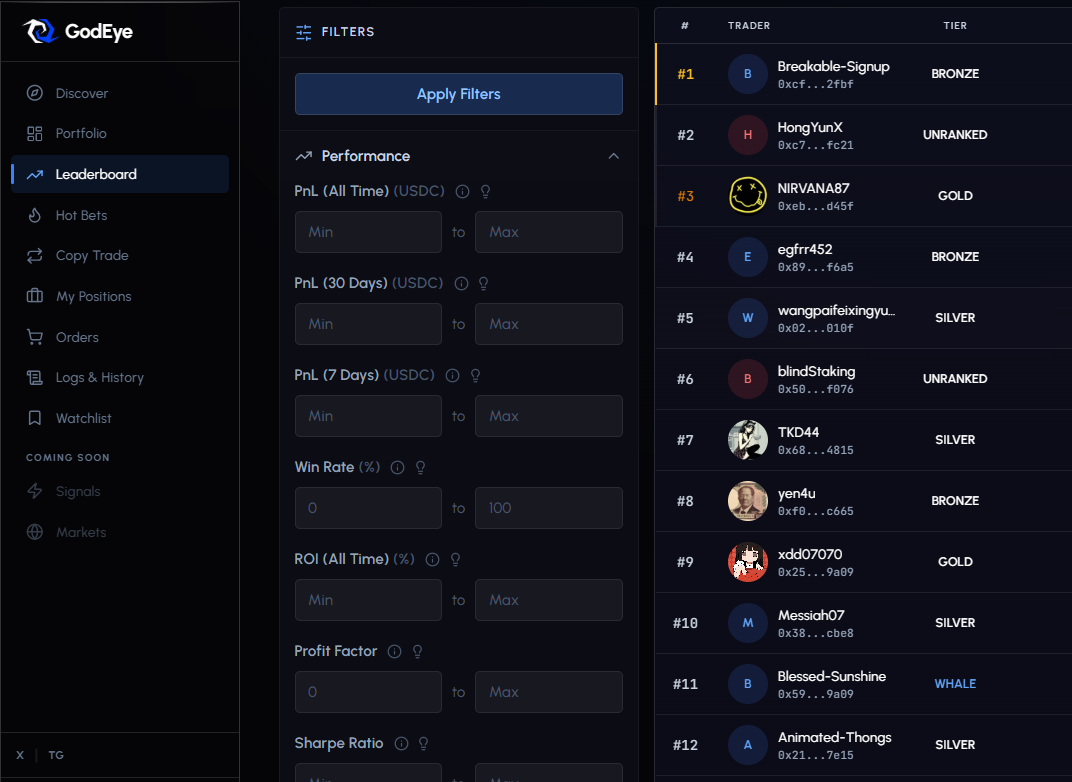
The advanced filter panel lets you set precise ranges beyond the basic tier/category/timeframe filters. Open it by clicking the filter icon on the leaderboard.
All filters stack together. Set as many or as few as you need.
Win Rate Range
Set a minimum and/or maximum win rate percentage.
- Use case: Find consistent traders. A minimum of 55-60% filters out the noise.
- Example: Min 60%, Max 90% returns traders with strong but not suspiciously perfect records.
Profit Range
Set minimum and/or maximum total P&L in USDC.
- Use case: Filter out small-time traders or exclude outliers.
- Example: Min $5,000 profit ensures you only see traders with meaningful track records.
Volume Range
Set minimum and/or maximum total trading volume.
- Use case: Find active traders. Low volume means few trades, which makes stats unreliable.
- Example: Min $50,000 volume ensures the trader has enough history to evaluate.
Trade Count Range
Set minimum and/or maximum number of trades.
- Use case: A trader with 3 trades and 100% win rate is not the same as one with 200 trades and 75% win rate. More trades = more reliable stats.
- Example: Min 50 trades filters out lucky one-hit wonders.
Insider Score Range
Set a minimum and/or maximum Insider Score (0-100).
- Use case: Find traders who may have an information edge. Higher scores indicate unusual timing patterns, first-bet anomalies, and high win rates on surprise outcomes.
- Example: Min 40 surfaces traders with notable timing or conviction patterns.
Copyability Score Range
Set a minimum and/or maximum Copyability Score (0-100).
- Use case: Not every profitable trader is practical to copy. This score factors in trade frequency, position sizes, hold times, and consistency.
- Example: Min 60 filters for traders whose style translates well to copy trading.
Combining Filters
| Strategy | Filters |
|---|---|
| Conservative copy targets | Tier: Gold+, Win Rate: 60%+, Copyability: 65+, Trades: 100+ |
| High-conviction insiders | Insider Score: 50+, Win Rate: 55%+, Volume: $25k+ |
| Active high-volume | Volume: $100k+, Trades: 200+, sorted by Profit |
| Crypto specialists | Category: Crypto, Win Rate: 55%+, Trades: 50+ |
Trader Profiles
Click any trader to open their full analytics page.
Action buttons: Copy Trader, Add to Watchlist, Compare, View on PolygonScan, Share, Refresh
Performance Stats Grid
| Metric | Description |
|---|---|
| Win Rate | Percentage with visual bar |
| Total P&L | All-time profit/loss |
| 30D P&L | Last 30 days |
| Avg Trade Size | Average bet amount |
| Total Trades | Lifetime trade count |
| Total Volume | Lifetime volume |
| Sharpe Ratio | Risk-adjusted returns |
| Insider Score | Information edge estimate |
| Copyability Score | Copy suitability |
Charts
Interactive charts with hover to see exact values:
| Chart | What It Shows |
|---|---|
| Performance Chart | Cumulative P&L line over time |
| Daily P&L | Bar chart: green profit days, red loss days |
| Category Distribution | Pie chart: which markets the trader focuses on |
| Odds Distribution | Histogram of entry prices. Buying at 0.20-0.40 = contrarian bets, 0.60-0.80 = backing favorites. |
| Size Distribution | Histogram of position sizes. Shows if betting is consistent or volatile. |
| Timing Analysis | When bets are placed relative to resolution. Early = conviction, late = possible information edge. |
| Yes/No Trend | Long-term bias toward YES or NO positions |
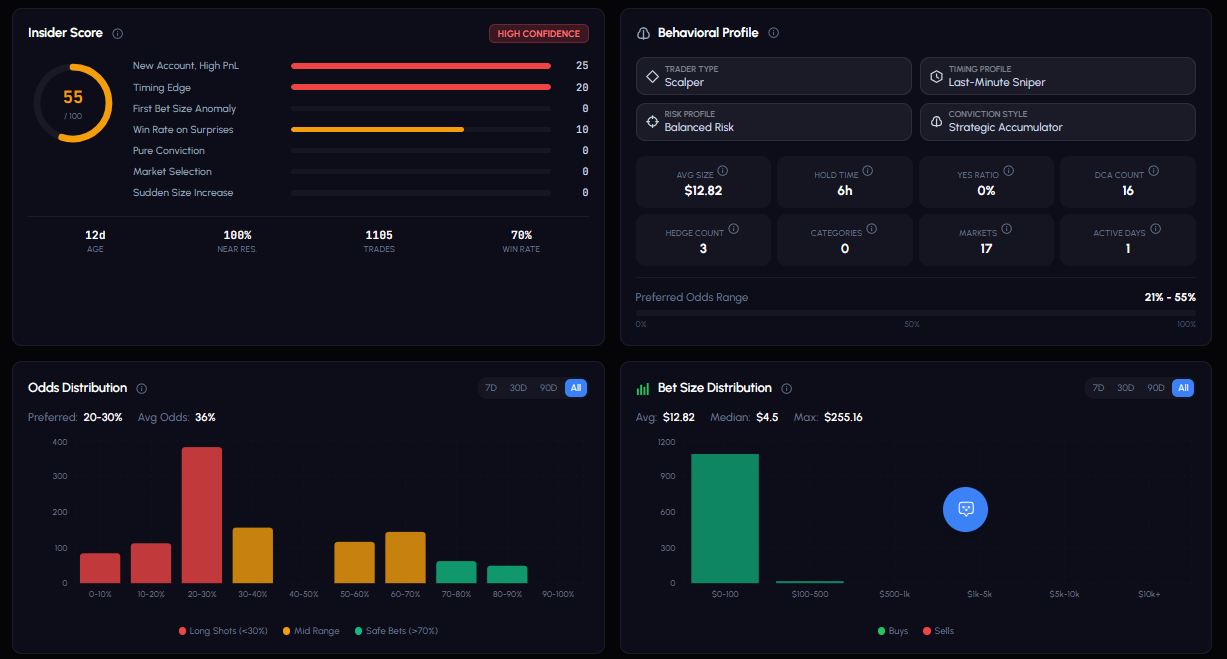
Insider Score Card
A 0-100 score estimating information edge probability, with breakdown:
- New wallet with unusually high P&L per day
- Large first-bet anomalies
- Timing patterns (betting close to resolution)
- Win rate on surprise outcomes
- Conviction patterns (concentrated bets)
Ranges: 0-30 (Normal), 30-70 (Notable), 70+ (Highly Unusual)
Behavioral Profile
Analysis of the trader’s style: position sizing patterns, entry timing preferences, market category preferences, win/loss clustering, and risk tolerance.
Open Positions
Table of current active positions: market, side (YES/NO), entry price, current price, unrealized P&L, size, status.
Markets Traded
Table of all markets participated in: market title, category, outcomes traded, volume, best performance, trade count.
Trade History
Full table: date, market, side, size, price, outcome, P&L. Filterable and sortable. Click to expand details.
Scores
Every trader gets three proprietary scores from 0-100.
| Score | Measures | Use It To |
|---|---|---|
| Overall | Profitability, win rate, risk management, experience, recency. One weak area drags the whole score. | Find well-rounded traders |
| Insider | Information advantage: timing edges, first-bet anomalies, win rate on surprises, conviction patterns. | Spot traders with unique insights |
| Copyability | Practical copy suitability: activity, hold times, trade sizes, frequency. | Find the best targets for copy trading |
Tier System
Tiers are based on all-time profit, win rate, and trade count. All three criteria must be met. Updated daily.
| Tier | Description |
|---|---|
| Whale | Elite: top profits, high win rates, significant experience |
| Gold | Very strong: proven, consistent track record |
| Silver | Solid: reliable results above average |
| Bronze | Decent: meets baseline criteria |
| Unranked | New or below minimum thresholds |
Whale Compare
Compare up to 5 traders side by side.
- Open Whale Compare from the sidebar or click Compare on any trader profile.
- Search traders by name or address in the dropdown.
- Click to add (up to 5). Each appears as a removable chip.
- Review the comparison table.
Metrics Compared
| Metric | Description |
|---|---|
| Tier | Tier badge |
| Rank | Current rank |
| 30D P&L | Last 30 days profit/loss |
| All Time P&L | Lifetime profit/loss |
| Win Rate | Percentage of winning trades |
| Total Volume | Lifetime trading volume |
| Total Trades | Trade count |
| Avg Trade Size | Average bet amount |
| Open Positions | Current active positions |
| Copiers | Users copying this trader |
| Sharpe Ratio | Risk-adjusted returns |
Best values across the comparison are highlighted. Each column links to the trader’s profile and has a Copy button.
Share comparison URLs with others.
Watchlist
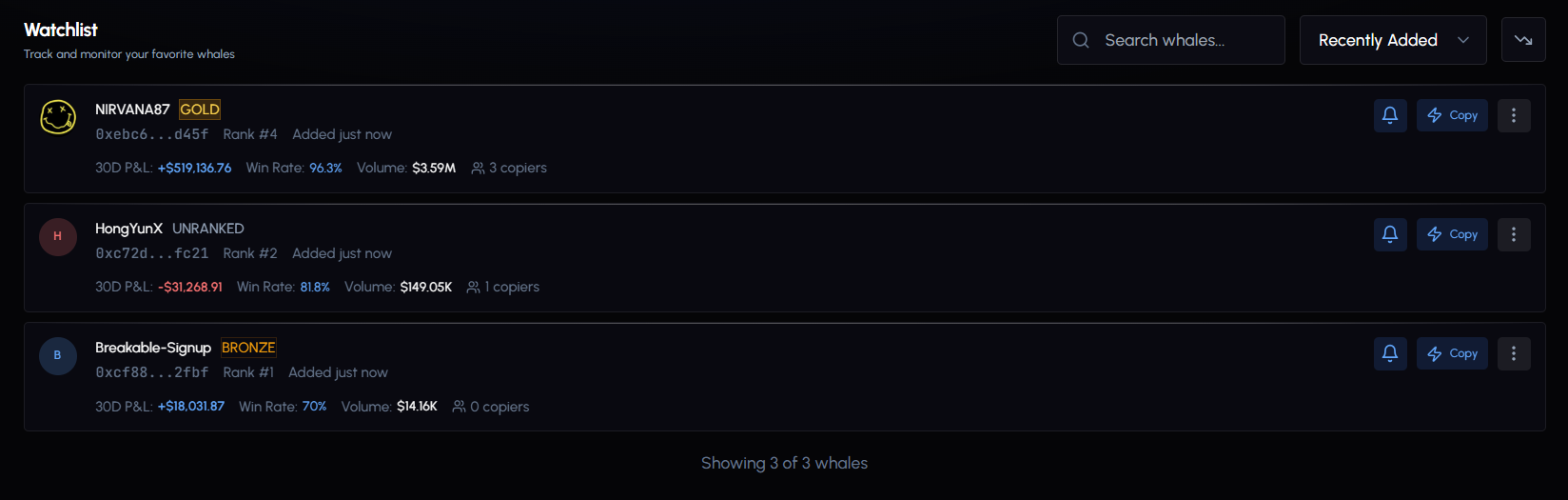
Save traders for quick access and monitoring.
Add: Click the star icon on any leaderboard row or trader profile.
Watchlist Card
Each entry shows:
| Element | Description |
|---|---|
| Avatar | Profile image or initial |
| Name | Custom nickname, display name, or address |
| Tier badge | Color-coded tier |
| Address | Truncated wallet address |
| Rank | Current position |
| Added time | When you added this trader |
| 30D P&L | Recent performance (color-coded) |
| Win Rate | Win percentage |
| Volume | Total trading volume |
| Copiers | Number of users copying |
| Notes | Your private notes (if set) |
Customization
Click Edit (pencil icon) on any entry to:
| Setting | Description |
|---|---|
| Custom nickname | Friendly name (max 50 characters) |
| Notes | Private notes about this trader (max 500 characters) |
| Notify on big trades | Alert when trader makes a trade over $1,000 |
| Notify on all trades | Alert on every trade |
Toggle ascending/descending. Search by address, username, display name, or nickname.
Blacklisting
Wallets flagged as bots (3,500+ trades/week) are removed from the leaderboard and search. Active copy configs targeting blacklisted wallets are auto-paused.
You can still force-copy a blacklisted wallet at your own risk. A warning is shown listing what data may be unavailable.