Wallet & Deposits
Manage funds, deposit from any blockchain, and view your full transaction history.
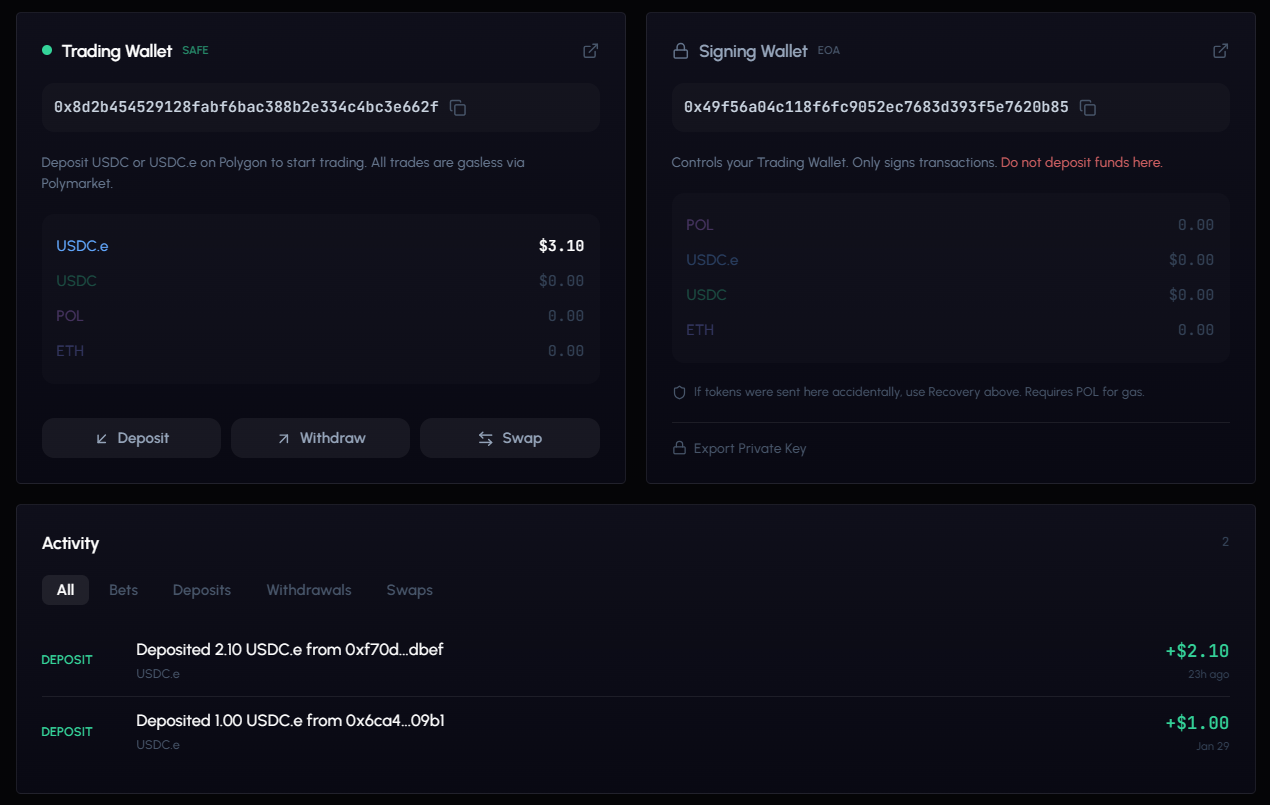
Wallet Overview
After completing wallet setup, your Wallet page displays:
| Section | Description |
|---|---|
| Total Portfolio | Combined value: available balance + in positions |
| Available | USDC ready to trade |
| In Positions | USDC currently in open positions |
| Locked | USDC locked in pending orders |
Use the eye icon to show/hide your balance for privacy.
Holdings Breakdown
Below the balance summary, a token list shows your holdings: USDC.e, USDC, POL, and ETH with individual amounts.
Signing Wallet vs Trading Wallet
| Wallet | Description |
|---|---|
| Trading Wallet (Safe) | Holds your funds and executes trades. This is where you deposit. |
| Signing Wallet (EOA) | Your auth identity wallet. Small POL balance for key operations. |
If your signing wallet (EOA) has stray funds, the Recover button lets you sweep them to your trading wallet.
Deposit Methods
Two tabs on the deposit panel: Polygon (direct) and Bridge (cross-chain).
Bridge Deposits (Recommended)
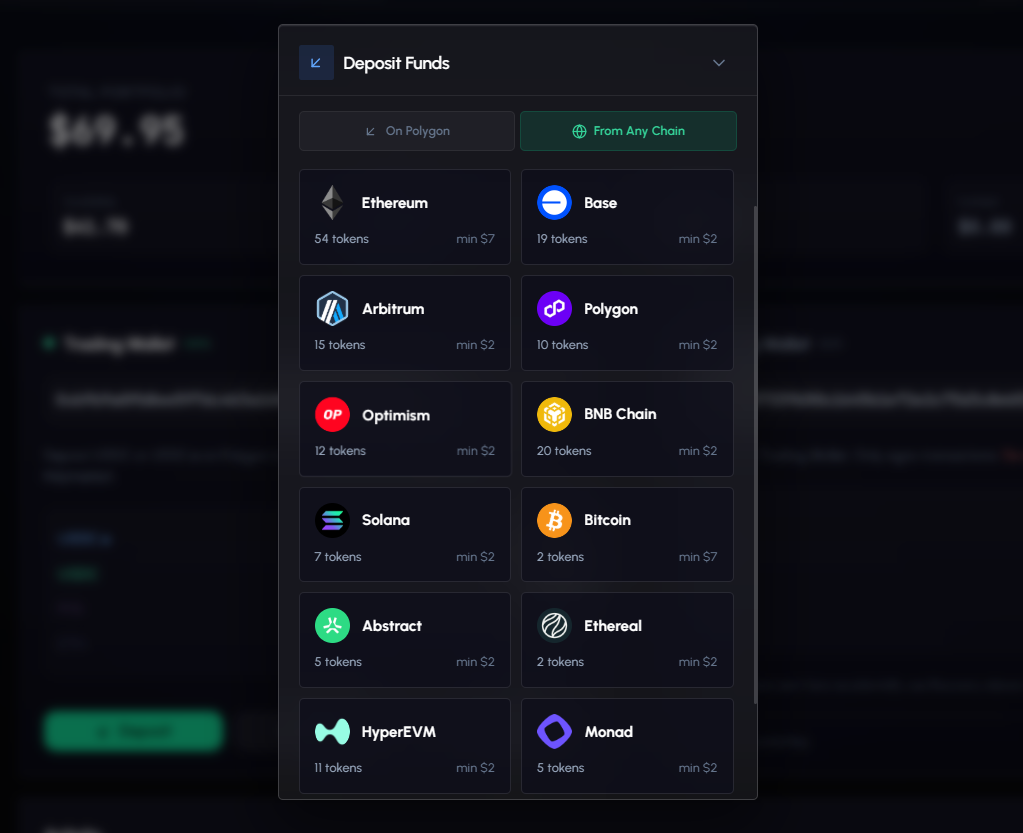
Deposit from 14+ blockchains. Tokens are automatically converted to USDC on Polygon.
Supported chains: Ethereum, Base, Arbitrum, Polygon, Optimism, BNB Chain, Solana, Bitcoin, Tron, HyperEVM, Monad, Abstract, Ethereal.
Step-by-step:
- Click Deposit on the Wallet page.
- Select the Bridge tab.
- Choose your chain: Click the blockchain where your funds are.
- Choose your token: Search or browse available tokens. Select the one you want to send.
- Review the quote: See the estimated USDC.e you’ll receive, gas cost, swap impact, and guaranteed minimum.
- Copy the deposit address and send from your external wallet (MetaMask, Phantom, etc.).
- Track progress through 4 stages:
| Stage | Description |
|---|---|
| Deposit Detected | Transaction seen on source chain |
| Processing | Bridge handling cross-chain transfer |
| Sending to Polygon | Funds en route to your Safe wallet |
| Complete | USDC.e available, ready to trade |
Most deposits complete in 2-5 minutes. Bitcoin may take longer due to block confirmations.
Tips by chain type:
- EVM chains (Ethereum, Base, Arbitrum, etc.): use your standard 0x wallet
- Solana: use Phantom or similar with the SVM deposit address
- Bitcoin: use a native BTC wallet. Allow extra time.
- Tron: use TronLink or similar with the TVM address
Direct Polygon Deposit
If you already have USDC on Polygon:
- Click Deposit and select the Polygon tab.
- Copy your Safe wallet address.
- Send USDC or USDC.e on the Polygon network.
- Balance updates within 1-2 minutes.
Only use Polygon network for direct sends. Wrong network = lost funds. Use the bridge for cross-chain deposits.
Withdrawals
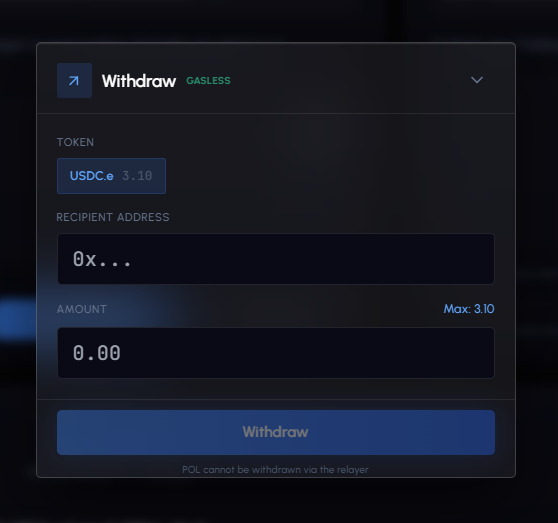
- Click Withdraw on the Wallet page.
- Select the token to withdraw.
- Enter the recipient address and amount (or click Max).
- Review and confirm.
Withdrawals are sent on the Polygon network.
Swaps
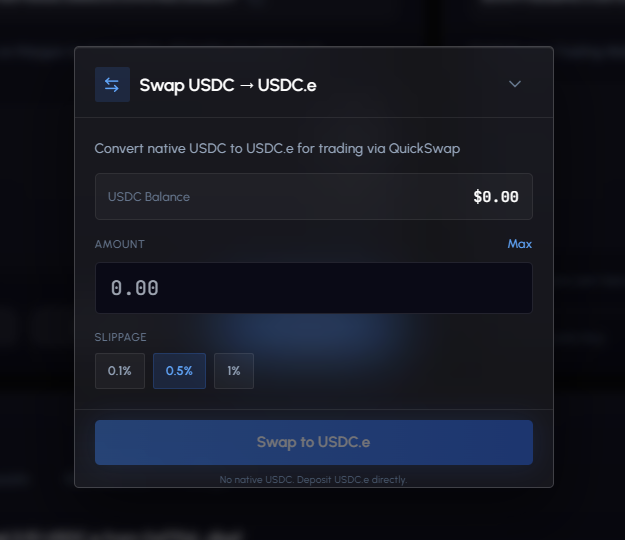
Convert between tokens directly on the Wallet page:
- Click Swap.
- Enter the amount to swap.
- Select slippage tolerance: 0.1%, 0.5%, or 1%.
- Review the quote and confirm.
Transaction History
The bottom of the Wallet page shows a timeline of all transactions, newest first.
Tabs
| Tab | Shows |
|---|---|
| All | Every transaction |
| Bets | Buys and sells |
| Deposits | Incoming funds |
| Withdrawals | Outgoing funds |
| Swaps | Token swaps |
Transaction Types
| Type | Color | Description |
|---|---|---|
| Buy | Blue | Purchased shares |
| Sell | Gray | Sold shares |
| Deposit | Green | Funds received |
| Bridge | Green | Cross-chain bridge deposit |
| Withdrawal | Red | Funds sent out |
| Swap | Blue | Token swap |
| Won | Green | Settlement payout from winning position |
| Lost | Red | Settlement loss |
| Fee | Gray | Trading or platform fee |
| Reward | Green | Bonus received |
| Referral | Green | Referral bonus |
Each row shows: type label, description, amount, relative timestamp, and a link to view the transaction on Polygonscan.
Security
| Feature | Description |
|---|---|
| Non-custodial | You hold the keys. GodEye cannot move your funds. |
| Safe Smart Wallet | Battle-tested smart contract wallet standard. |
| Signature-only | Every trade requires your cryptographic signature. |
| USDC only | No volatile token exposure. |
| Gasless | All operations relayed. No POL/MATIC needed for trading. |
| Export Key | You can export your private key at any time from the Wallet page. |
Troubleshooting
Balance not showing after deposit? Wait 2-3 minutes. Check the transaction on Polygonscan. If using the bridge, check the tracker. Refresh the page.
Wallet setup stuck? Try Reset Wallet at the bottom of the setup page. Clear browser cache and try again.
Bridge deposit not arriving? Confirm the send transaction succeeded on the source chain explorer. Most deposits take 2-5 minutes. Bitcoin takes longer. After 5 minutes, contact support on Telegram.
Need to recover EOA funds? Click the Recover button on the Wallet page to sweep signing wallet funds to your trading wallet.